

The release notes provide information on the features and improvements in the specified version. The release dates that are related to the version of the release are published in the Curriculum/Workload Management release schedule.
Improvements
The issues in release mentioned under the section improvements are considered as new functionality, user experience improvements or bug fixes. Issues marked as Hotfix have been developed during this Sprint release, but are hotfixed and technically added to the previous release or direct to production based on the impact of the issue.
Fields should not incorrectly be set to read-only - CUR-2601, CUR-2602 (Hotfix)
Some standard fields defined as editable were shown as read-only. This has been hotfixed.
Dropdown lists should respect the defined sequence and configuration - CUR-2563, CUR-2549 (Hotfix)
Values in a drop-down lists were shown in a 'random' order and sometimes arbitrary add a NaN value. This was the case for both text and numeric / time based values. The drop-down list should use the defined sequence. This has been fixed (restored), so the drop-downs are shown in the correct, defined order.
A second issue was that the drop-down value only showed the code and didn't respect the configured display. This has been fixed, so the drop-down value can now be shown and search for using both code and/or name.
The offering should respect the configuration to display code, name and location - CUR-2579, CUR-2617(Hotfix)
The offering location was not always shown according to the configured pattern that was set to show both the period and its location. The analysis learned this was only the case when using alternative offerings. The location is then defined on the original offering and not on the alternative. The logic tried to show the (not available) location of the alternative offering. A fix is applied to cover this case.
The second use case was that the offering dropdown only showed the code instead of the code and the name in the offering modal. This is also fixed in this release.
Added language support for French - CUR-2566
Language support for French is added to the user interface. By setting the language configuration to fr, the user interface will be available in French.
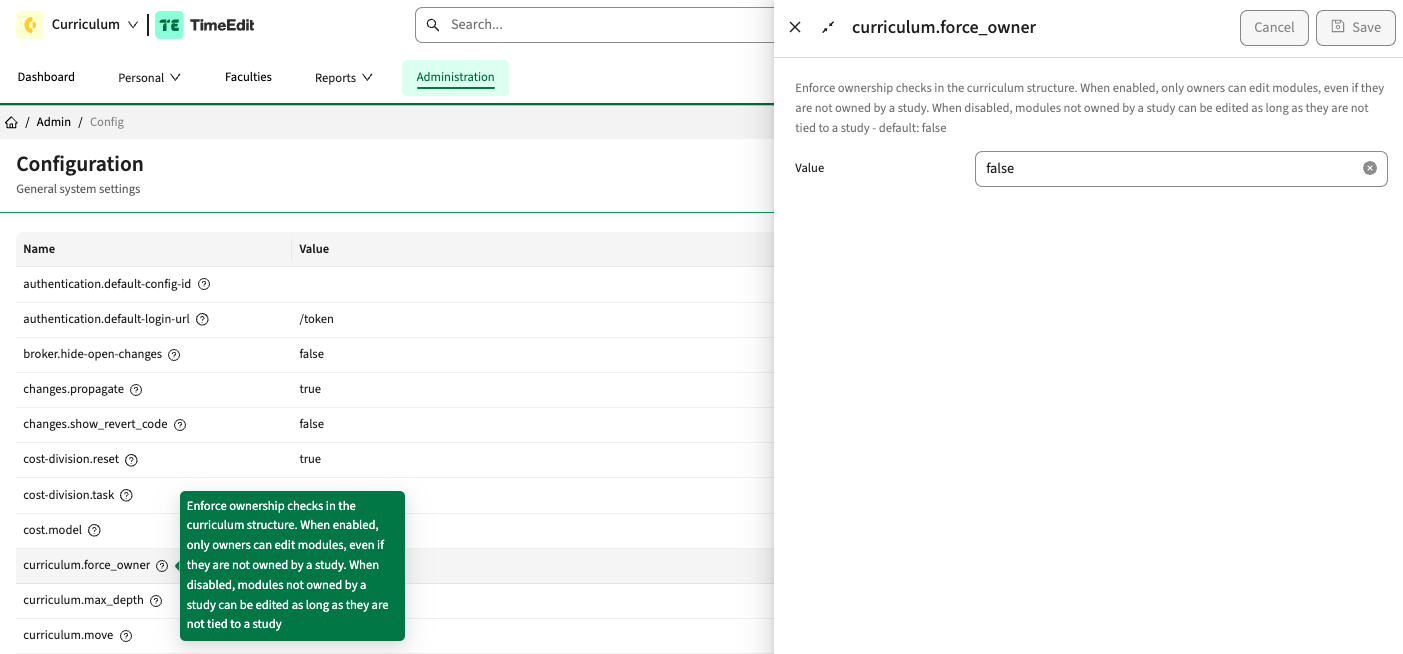
User experience configuration enhanced - CUR-2259
The configuration page is migrated to the new look and feel. The information shown to the administrator is improved with labels and additional background information when editing a configuration option.
The appraisal page should support additional options for enabling assessment management - CUR-2509
A new option is added to steer / limit the access to add and remove buttons on the appraisal page. This allows for a further distinction in if and when buttons should be accessible to manage the assessments.
The added options to the appraisal page added are:
- Hide add: hide the add appraisal button
- Hide delete: hide the delete appraisal button
The configuration will be applied on top of the defined authorisation roles. So in case a user has rights to add an appraisal based on the role, the hide add configuration on the appraisal page can restrict this by hiding the add button.
The process widget on the general page should be enlarged - CUR-2106
The proces widget on the general tab was always cut off at 4.5 processes (but scrollable to show more). A change is applied to improve the user experience by enlarging the box to show more processes. In case the number of processes even exceed the enlarged proces widget, a scroll-option is provided.
As an admin I want to be able delete an activity-serie - CUR-2429
An created activity-serie didn't have an option to be deleted from the system. Only the relation to the method-scheme could be 'removed'. To cover for mistakes or unwanted activity-series the option is introduced for the Administrator to removed an activity-serie.
The implementation is similar with all other objects, e.g. Study, Module. An admin page is added to the activity-serie and the admin page will provide the option to delete the activity-serie.
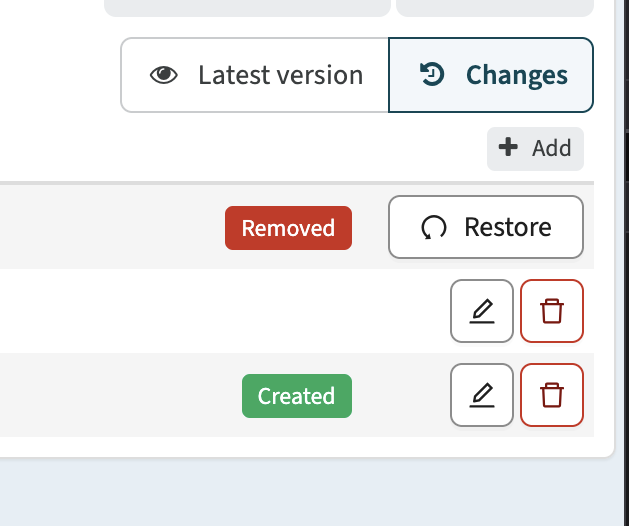
User experience should be standardised for information labels and buttons - CUR-2450, CUR-2610, CUR-2559
On some pages when using both buttons and labels the distinction between a button and a label was limited. For instance, the delete button was very similar to the label information deleted, confusing users.
This release a user experience improvement is applied to standardise the buttons and labels, improve the difference in visualisation and improve the user understanding and experience.
An example of a form both showing labels and buttons using the new user experience is shown below. The buttons are when possible using the TimeEdit standard icon set. The labels are slightly different, and show relevant information using standard colouring.
The calculated group number should be saved - CUR-2638
In case a formula is defined to determine the numberOfGroups field, the groups are calculated, shown, but not saved. A fix is applied to not only calculate and show the number of groups, but also save the calculated value.
UI for academic year management is redesigned - CUR-2591
As part of the overall migration to the new look and feel the administrator academic year and calendar pages have been redesigned and transformed to the new look and feel. Changes applied are:
- The Edit button on
/admin/calendarand/admin/academic-yearnow opens an edit drawer - Clicking a row, code, or View details link in the drawer navigates to the detail page
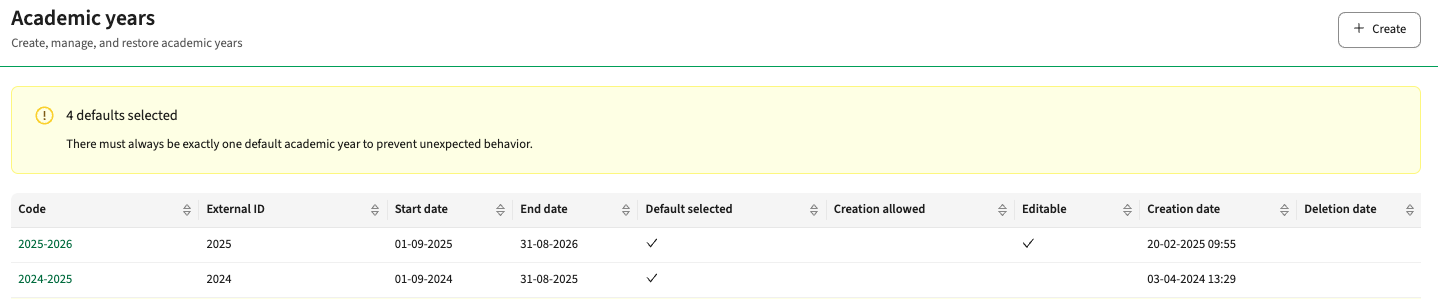
- A warning is shown when there is not exactly one default Academic Year
- A warning is shown if there is no default Calendar
- Edit drawers now include additional sections with read-only fields and visual separators
- Start and end values in the ribbon period list are displayed as full periods instead of numeric values
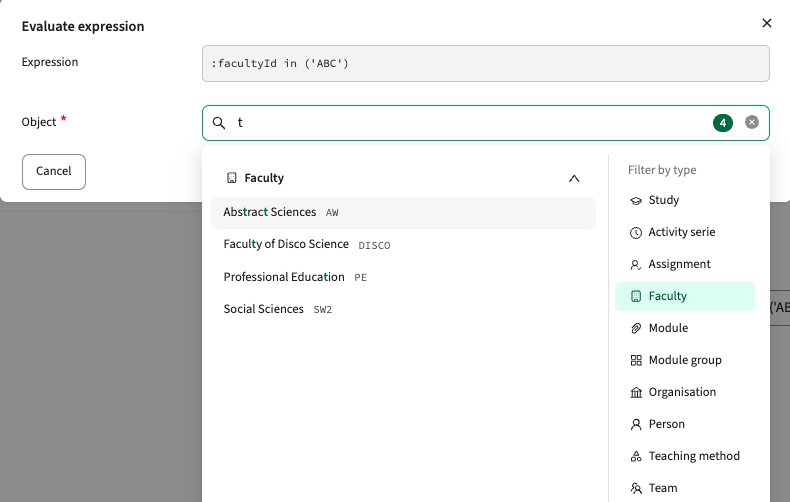
- Redesigned expression input and validation modal, with filtering by type (full search)
The academic year will show a warning in case a misconfiguration is noted.
The calendar management is redesigned, using new buttons.

Selecting the Edit button will open the slider to manage the calendar settings.
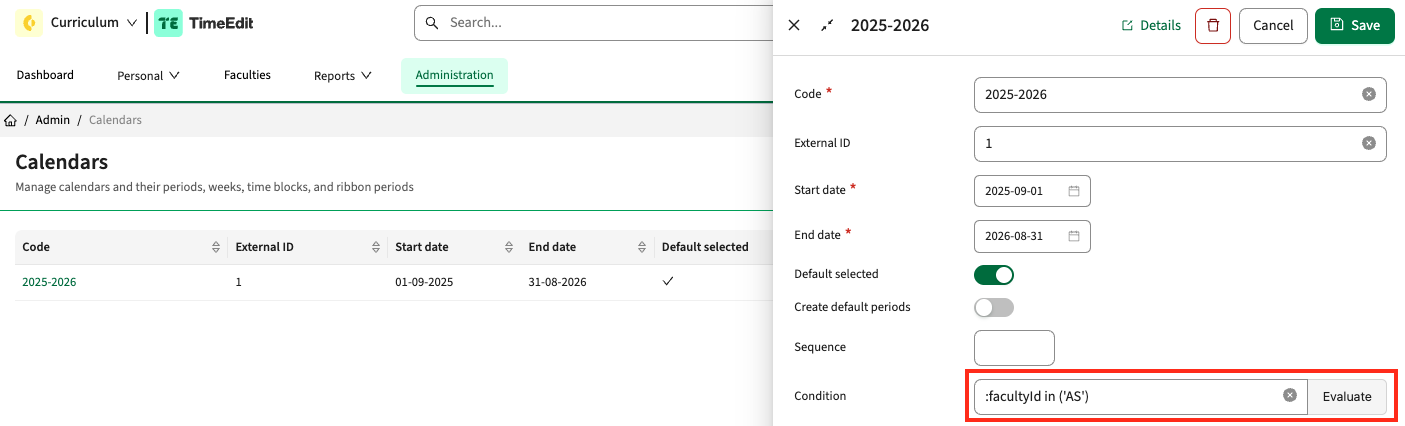
The evaluation validation is extended with the filtered search for objects. * This evaluation adjustment is currently only available when managing the calendar.
As a user I want insight in tasks assigned to another user - CUR-2539
When using the workflow option to enable assignment of tasks in case multiple users are assigned the distinction between 'not yet assigned' and 'assigned' tasks was not intuitive. The assigned tasks were shown at the bottom of the list and showed a small 'person' icon to show it was assigned. A change is applied to provide a more intuitive user experience by greying out the assigned tasks.
Year rollover should support rollover for multiple faculties in one go - CUR-2595, CUR-2597
When creating a new year and roll-over the data from the previous year an error occurred. It was found the error only occurred in case multiple faculties were selected and rolled-over. The roll-over per faculty offered a work-around. In this release a fix is applied that will enable the roll-over of multiple (or all) faculties again.
The duration should only show the dropdown options - CUR-2609
The new duration field implementation always showed the 'other' option enabling to define a non-standard duration. The default behaviour should be that the user can select from the default defined values and select other from these values in case a non-standard duration is required. The change to support this has been implemented in this release.
ACTION REQUIRED:
The change applied may have impact for existing users that use the 'Other' option. The default behaviour was that the 'Other' option was standard added to the defined list. Based on requests to not provide the option to define another value, a choice is made to make the visibility of the Other option configurable.
To use 'Other' in activities make sure to add a new element with a '-1' external ID in the "Lecture duration" or Assessment duration" element list.
Dropdown fields used on a read-only page should be shown as read-only - CUR-2605
Dropdown fields defined on a form page that was marked as read-only where not shown as read-only. A fix is applied to show the dropdown field value as a read-only value.
Integration
The issues mentioned under the section integration are considered as extension, improvements or bug fixes related to the Curriculum API, OOAPI and/or CSV import functionality.
Import of module group modules should support usage of module code - CUR-2594
When importing a module group and its module relations, the modules were not always set correctly. Further investigation learned that modules not having an external Id where considered and left out setting the relation. A fix is applied to take all modules into consideration.
Security
An integral part of our development and build process is automatic scanning for known security vulnerabilities. The vulnerabilities will be fixed based on their impact, which means that in some cases an immediate hot-fix will be applied, and in other cases the vulnerability will be fixed in the current or next Sprint (release). The security section provides an overview of the vulnerabilities mitigated. For more information on reported vulnerabilities, see the central database of vulnerabilities.
Take-over option should only be available for authorised users - CUR-2576 (Hotfix)
In some cases the 'Take over' button was shown to user not having the appropriate role or rights. The cause was found and has been hotfixed.
Admin pages should only be accessible for administrators - CUR-2511
Sometimes a ticket delivers more then initially thought of ... The use case was that a normal user could get access to an admin page by entering the fully qualified URL. This allows this user to see data, not to manipulate it.
A fix is applied to shield the access to the admin pages completely for standard users, even if they manually enter the fully qualified URL. But there it didn't stop.
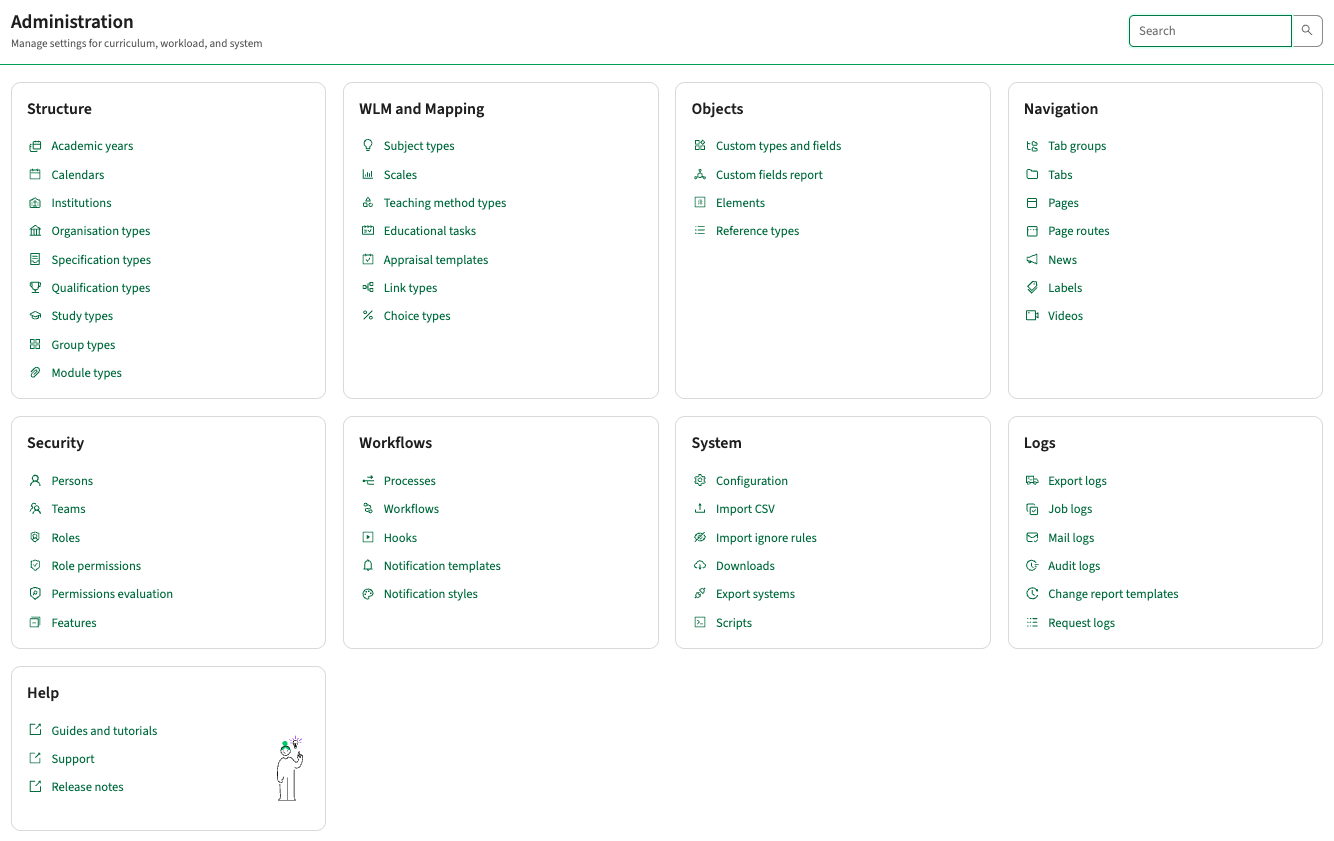
The implementation standardised the route to the different admin pages and while changing the route the full admin interface is changed and migrated to the new look and feel. The different admin options are grouped in a more logical way, a search is added to directly find an admin option.
Refer to the Workload Management manual for configuration guidance.